Jumat, 24 Juni 2011

Catatan Analisis Perancangan Jaringan Komputer 11

Merancang jaringan 5 Gedung
Adapun prinsip yang dapat dikembangkan yaitu:
  1. Untuk perancangan antar gedung , digunakan prinsip routing, prinsip ini dapat menghubungkan segmen jaringan yang berbeda dengan menggunakan router.
  2. Untuk perncangan jaringan internal atau dalam gedung dapat menggunakan teknik subnetting.
  3. Topologi yang digunakan yaitu topoli mesh untuk antar gedung dan topologi star untunk internal dalam gedung
  4. Untuk mencegah jaringan terputus dan memberikan alternatif makan diberikan pula dua buah koneksi internet.
  5. Sebenarnya konsep ini masih memiliki kelemahan yakni boros kabel.
Hardware Yang di Butuhkan
  1. Router
  2. Swicth
  3. PC komputer
  4. Kabel jaringan
  5. Wifi Hotspot terdapat pada gedung C
Konsep Perancangan
Perancangan jaringan ini menggunakan teknik bridge, dengan topologi mesh untuk di antar gedung, dan topologi star untuk dalam gedung.
Gedung A
Pada Gedung A ini ada 2 lantai, untuk tiap lantai memerlukan 2 buah switch yang mana setiap lantai memiliki jumlah host 10 buah. Pada gedung ini dibagi menjadi 2 segmen jaringan, dengan teknik subnetting Kemudian untuk konfigurasi IP kita menggunakan 192.168.101.0 /27
Kemudian IP 192.168.101.1   dipakai untuk gateway jaringan yang terpasang pada router.
Gedung B
Pada Gedung B ini ada 2 lantai, untuk tiap lantai memerlukan 2 buah switch yang mana setiap lantai memiliki jumlah host 10 buah. Pada gedung ini dibagi menjadi 2 segmen jaringan, dengan teknik subnetting Kemudian untuk konfigurasi IP kita menggunakan 192.168.102.0 /27
Kemudian IP 192.168.102.1 dipakai untuk gateway jaringan yang terpasang pada router.
Gedung C
Pada Gedung C ini ada 2 lantai, untuk tiap lantai memerlukan 2 buah switch yang mana setiap lantai memiliki jumlah host 10 buah. Pada gedung ini dibagi menjadi 2 segmen jaringan, dengan teknik subnetting Kemudian untuk konfigurasi IP kita menggunakan 192.168.103.0 /27. Khusus lantai 1 kita menggunakan layanan wireless dan konfigurasi IP client di atur oleh DHCP.
Kemudian IP 192.168.103.1 dipakai untuk gateway jaringan yang terpasang pada router.
Gedung D
Pada Gedung D ini ada 2 lantai, untuk tiap lantai memerlukan 2 buah switch yang mana setiap lantai memiliki jumlah host 10 buah. Pada gedung ini dibagi menjadi 2 segmen jaringan, dengan teknik subnetting Kemudian untuk konfigurasi IP kita menggunakan 192.168.104.0 /27
Kemudian IP 192.168.104.1 dipakai untuk gateway jaringan yang terpasang pada router.
Gedung E
Pada Gedung E ini ada 2 lantai, untuk tiap lantai memerlukan 2 buah switch yang mana setiap lantai memiliki jumlah host 10 buah. Pada gedung ini dibagi menjadi 2 segmen jaringan, dengan teknik subnetting Kemudian untuk konfigurasi IP kita menggunakan 192.168.105.0 /27
Kemudian IP 192.168.104.1 dipakai untuk gateway jaringan yang terpasang pada router.
Untuk lebih detailnya lihat pada perancangan jaringan di bawah ini:
Gambar Jaringan Internal dalam Gedung , seperti berikut:
Gedung B
GEdung C
Gedung D
Gedung E

Catatan Disain dan Analisis Keamanan jaringan 10

Mensetting Virtual Virtual Mesin(VMware)
Cara mensetting Vmware:
  1. Setting Virtual mesin di PC komputer
  2. Koneksikan dengan jaringan melalui Acses Point (dalam hal ini Linksys)
  3. Settinglah IP PC Komputer virtual (Misalnya: ifconfig eth0 192.168.1.2)
  4. Chek kompter yang aktif beserta MAC Addressnya yang berada dalam jaringan. (Misalnya ping 192.168.1.102)
Perintah-perintah yang di masukkan antara lain:
ip config/ all  —->(windost, host, mac address, Ip address)
nmap – Sp 192.168.1.1 -254 –> untuk menchek host yang konek
nmap -0 192.168.1.1 -254
nmap -OS 192.168.1.1 -254
starx –> perintah untuk merubah linux dengan tampilan grafik
lalu lakukan login dengan cara: telnet_IPsendiri –> masuk (inputkan username dan password).

Catatan Analisis Perancangan Jaringan Komputer 10

Fitur Perancangan Jaringan
1. Service
  • Ip Otomatis
  • DHCP (Dinamis Host Configuration Protocol). DHCP Relay yaitu service yang meneruskan IP secara otomatis. DHCP Authentifikasi berupa MAC ADdress.
DCHP ( Dynamic Host Configuration Protocol ) adalah protokol yang berbasis arsitektur client/server yang dipakai untuk memudahkan pengalokasian alamat IP dalam satu jaringan. Sebuah jaringan lokal yang tidak menggunakan DHCP harus memberikan alamat IP kepada semua komputer secara manual. Jika DHCP dipasang di jaringan lokal, maka semua komputer yang tersambung di jaringan akan mendapatkan alamat IP secara otomatis dari server DHCP. Selain alamat IP, banyak parameter jaringan yang dapat diberikan oleh DHCP, seperti default gateway dan DNS server.
  • RADIUS (Remote Access Dial In User Service). Digunakan untuk jarak jauh.
Remote Authentication Dial-In User Service (sering disingkat menjadi RADIUS) adalah sebuah protokol keamanan komputer yang digunakan untuk melakukan autentikasi, otorisasi, dan pendaftaran akun pengguna secara terpusat untuk mengakses jaringan. RADIUS didefinisikan di dalam RFC 2865 dan RFC 2866, yang pada awalnya digunakan untuk melakukan autentikasi terhadap akses jaringan secara jarak jauh dengan menggunakan koneksi dial-up. RADIUS, kini telah diimplementasikan untuk melakukan autentikasi terhadap akses jaringan secara jarak jauh dengan menggunakan koneksi selain dial-up, seperti halnya Virtual Private Networking (VPN), access point nirkabel, switch Ethernet, dan perangkat lainnya.
Radius banyak dipakai oleh Provider dan ISP internet untuk authentikasi dan billingnya. Radius juga bisa dipakai oleh jaringan RT/RW-Net untuk authentikasi para penggunanya dan untuk mengamankan jaringan RT/RW-Net yang ada. Di indonesia sudah ada service radius, namun berbayar seperti indohotspot.net . Ada juga service yang tidak berbayar, dan dikelola oleh luar negeri seperti chillidog.org Selain lebih menghemat budget, dan juga menghemat biaya maintenance, sistem Radius yang di host di internet merupakan salah satu solusi murah untuk para penggagas sistem HotSpot.
  • LDAP
LDAP (Lightweight Directory Access Protocol) adalah protokol perangkat lunak untuk memungkinkan semua orang mencari resource organisasi, perorangan dan lainnya, seperti file atau printer di dalam jaringan baik di internet atau intranet. Protokol LDAP membentuk sebuah direktori yang berisi hirarki pohon yang memiliki cabang, mulai dari negara (countries), organisasi, departemen sampai dengan perorangan. Dengan menggunakan LDAP, seseorang dapat mencari informasi mengenai orang lain tanpa mengetahui lokasi orang yang akan dicari itu.
2. Monitoring
  • SNMP(Simple Network Management Protocol).
Simple Network Management Protocol (SNMP) merupakan protokol standard industri yang digunakan untuk memonitor dan mengelola berbagai perangkat di jaringan Internet meliputi hub, router, switch, workstation dan sistem manajemen jaringan secara jarak jauh (remote). Baru-baru ini (pertengahan Februari 2002) Oulu University Secure Programming Group, sebuah group riset keamanan jaringan di Finlandia, telah menemukan adanya kelemahan pada SNMP v1.
Kelemahan tersebut memungkinkan seorang cracker memasang back door pada peralatan yang menggunakan SNMP v1 sehingga bisa menyusup ke jaringan dan melakukan apa saja terhadap jaringan. Kelemahan ditemukan pada SNMP trap and request facilities yang memungkinkan penyusup memperoleh akses ke dalam sistem yang menjalankan SNMP dan melakukan serangan Denial of Service (DoS) yang membuat sistem tidak berfungsi (down) atau tidak stabil.
  • MRTG
MRTG (the Multi Router Traffic Grapher) Adalah aplikasi yang digunakan untuk memantau beban trafik pada link jaringan. MRTG akan membuat halaman HTML yang berisi gambar GIF yang mengambarkan trafik melalui jaringan secara harian, mingguan, bulanan dan tahunan. MRTG dibuat oleh Tobias Oetiker menggunakan Perl dan C dan tersedia untuk sistim operasi UNIX dan Windows NT.
3. Routing Dinamis
  • OSPF
Open Shortest Path First (OSPF) adalah sebuah routing protokol standar terbuka yang telah di implementasikan oleh sejumlah besar vendor jaringan.
OSPF bekerja dengan sebuah algoritma yang disebut Dijkstra. Pertama, sebuah pohon jalur terpendek (shortest path tree) akan dibangun, dan kemudian routing table akan diisi dengan jalur terbaik yang dihasilkan dari pohon tersebut. OSPF melakukan converge dengan cepat, meskipun tidak secepat EIGRP, dan OSPF mendukung multiple route dengan biaya (cost) yang sama, ketujuan yang sama.
  • RIP
Routing Information Protocol (RIP) adalah sebuah protokol routing dinamis yang digunakan dalam jaringan LAN (Local Area Network) dan WAN (Wide Area Network). Karena itu protokol ini diklasifikasikan sebagai Interior Gateway Protocol (IGP). Protokol ini menggunakan algoritma Distance-Vector Routing. Pertama kali didefinisikan dalam RFC 1058 (1988). Protokol ini telah dikembangkan beberapa kali, sehingga terciptalah RIP Versi 2 (RFC 2453). Kedua versi ini masih digunakan sampai sekarang, meskipun begitu secara teknis mereka telah dianggap usang oleh teknik-teknik yang lebih maju, seperti Open Shortest Path First (OSPF) dan protokol OSI IS-IS. RIP juga telah diadaptasi untuk digunakan dalam jaringan IPv6, yang dikenal sebagai standar RIPng (RIP Next Generation / RIP generasi berikutnya), yang diterbitkan dalam RFC 2080 (1997).
  • BOP
TUGAS
Perancangan Jaringan komputer 2 Gedung
Perancangan ini dengan menggunakan sistem bridge:
Silahkan lihat gambar:

Catatan Disain dan Analisis Keamanan jaringan 9

VMware dan Linux BackTrack
cara mengistallVmware .
VMware Workstation adalah sebuah perangkat lunak mesin virtual untuk arsitektur komputer x86 dan x86-64 dari VMware, sebuah bagian dari EMC Corporation. Perangkat lunak ini digunakan untuk membuat banyak x86 dan x86-64 komputer virtual dan digunakan secara simultan dengan sistem operasi yang digunakan. Setiap mesin virtual tersebut bisa menjalankan sistem operasi yang dipilih, seperti Windows, Linux, varian BSD dan lain sebagainya. Dalam arti yang sederhana, VMware workstation bisa menjalankan banyak sistem operasi secara simulatan dengan menggunakan satu fisik mesin.

Versi yang telah diluncurkan

  • 01-11-2001 – VMware rilis Workstation 3.0.
  • 09-04-2002 – Workstation 3.1 diluncurkan saat Microsoft Tech-Ed 2002
  • 23-03-2003 – Workstation versi 4.0 diluncurkan.
  • 05-04-2004 – VMware mengumumkan rilis Workstation versi 4.5.
  • 11-04-2005 – Workstation versi 5.0 diluncurkan.
  • 12-09-2005 – VMware pembaruan Workstation ke versi 5.5.
  • 09-05-2007 – VMware rilis Workstation versi 6.0.
  • 23-09-2008 – VMware rilis Workstation versi 6.5.0
  • 21-11-2008 – VMware rilis Workstation versi 6.5.1
  • 31-03-2009 – VMware rilis Workstation versi 6.5.2
  • 20-08-2009 – VMware rilis Workstation versi 6.5.3
  • 26-10-2009 – VMware rilis Workstation versi 7
  • 29-01-2010 – VMware rilis Workstation versi 7.0.1

Catatan Analisis Perancangan Jaringan Komputer 8

Syarat komputer dengan komputer yang saling terhubung adalah komputer tersebut harus berada pada:
1. Net id yang sama
2. host id tidak boleh sama
3. network yang sama
4. IP broadcast-nya sama
Tugas
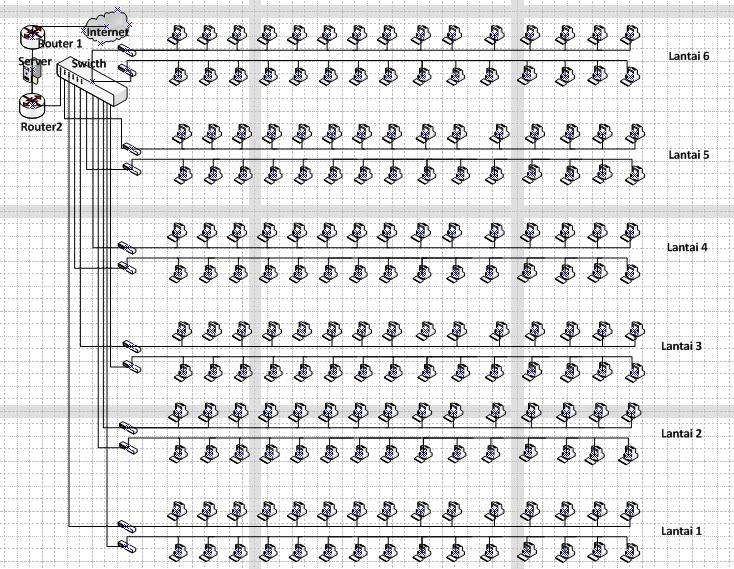
merakit jaringan komputer 6 lantai dengan masing-masing 30 PC perlantai.

Catatan Disain dan Analisis Keamanan jaringan 8

Hacker adalah seseorang yang mencoba masuk kedalam suatu jaringan secara paksa dengan tujuan mengambil keuntungan, tatpi bersifat merusak. Seseorang yang sangat senang mengeksplorasi suatu program dari suatu system untuk untuk mengetahui batas kemampuannya, dengan mengunakan cara-cara dasar yang akan digunakan oleh orang yang tidak mengerti dan mengetahui bagaimana program itu dibuat dan dengan pengetahuan minimum terhadap program.
Sedangkan Craker adalah seseorang yang mencoba masuk kedalam suatu jaringan secara paksa dengan tujuan mengambil keuntungan, merusak.

Langkah hacking system:
1. Foot printing
yaitu mencari rincian informasi terhadap sistem untuk dijadikan sasran, mencakup pencarian informasi dengan searching engine, who is, dan DNS zone transfer
2. Scanning
terhadap sasaran tertentu dicari pintu masuk yang paling mungkin, digunakan ping sweep dan port scan.
3. Enumeration
Telaah intersif terhadap sasaran yang mencari user account, network resources dan share dan aplikasi untuk mendapatkan mana yang proteksinya lemah.
4.Gaining Acces
Mendapatkan data lebih banyak lagi untuk mulai mencoba mengakses sasaran.
5. Escalating privilege
Bila baru mendapatkan user password ditahap sebelumnya. Ditahap ini diusahakan mendapatkan privilese admin jaringan dengan password cracking atau exploit sejenis getAdmin, schole atau ls message
6. Pilfering
7. Covering tracks
8. Creating Back Doors
9. Denial of Service

Jumat, 31 Desember 2010

Proposal Jaringan

1.Masalah jaringan karena kegagalan piranti jaringan

Skala gangguan akibat dari kegagalan piranti jaringan juga bisa bervariasi, dari hanya sebuah komputer karena kegagalan NIC – lan card; beberapa komputer karena kegagalan switch; atau bahkan berskala luas karena kegagalan pada switch central yang menghubungkan jaringan server. Untuk kegagalan lan card di salah satu komputer bisa diganti dengan network card cadangan anda.
Terus bagaimana kalau kegagalan jaringan itu akibat kerusakan pada switch? Design anda mengenai redundansi jaringan akan sangat membantu dalam menyelamatkan kegagalan jaringan anda. Kebutuhan load balancing dan redundansi haruslah dikaji untuk setiap kebutuhan berdasarkan penggunaan link redundansi; piranti router; switch dan multi-homed host yang bersifat kritis. Tujuan dari system redundansi ini dimaksudkan untuk menjamin ketersediaan layanan dimana tidak ada satupun titik rawan kegagalan.

2.Hal yang perlu di upgrade yaitu Masalah jaringan karena kegagalan kabel jaringan
Yang ini merupakan masalah jaringan yang umum kita temui akibat putusnya kabel jaringan yang bisa mempengaruhi kinerja sebuah komputer dalam jaringan karena putusnya kabel patch anda karena digigit tikus; masalah jaringan yang berdampak pada satu blok gedung karena putusnya kabel antar switch (uplink cable); atau bahkan berdampak pada sebagian besar komputer dalam jaringan lan anda karena kegagalan backbone cable.
3.anti virus perlu diupgrade untuk memperlancar jaringan.

Kamis, 02 Desember 2010

Lab 3.4.3 Part B: Configuring Inter-VLAN Routing

Step 1: Connect the equipment
Step 2: Perform basic configurations on the router
Step 3: Configure VLAN trunking on the router
Step 4: .Configure Switch 1
Are all other switch ports in VLAN 1?
Which switch ports are in VLAN 10?
Which switch ports are in VLAN 20?
Issue the command show vlan.
What difference is noticed between the two commands show vlan brief and show vlan?
Step 5: Configure VLAN trunking on Switch 1
Which interfaces on Switch 1 are in trunk mode?
Which VLANs are allowed and active in the management domain?
Step 6: Configure VTP on Switch 1
Step 7: Configure Switch 2
Step 8: Configure VLAN trunking on Switch 2
Step 9: Configure VTP on Switch 2
Switch2(config)#vtp mode client
From Switch 2, verify that all VLANs have been propagated across the domain by issuing the command show vtp status.
What is the VTP version used on Switch 2?
What is the maximum VLANs supported locally?
What VTP operating mode is used on Switch 2?
What is the VTP domain name?
How did Switch 2 learn the domain name and VLAN information?
Step 10: Verify connectivity
The router and switches should be able to ping the interfaces of the other devices.
a.       From each device, issue a ping to all interfaces.
Are the router pings successful?
b.      From Switch 1, ping to all other devices.
Are Switch 1 pings successful?
From Switch 2, ping to all other devices.
Are Switch 2 pings successful? __________ If the ping is not successful, verify the connections and configurations again. Check to ensure that all cables are correct and that connections are seated. Check the router and switch configurations.
Step 11: Reflection
a.       Why would VLANs be configured in a network?
b.      Why would a VLAN benefit from trunking?
c.       Why should VTP be used?
d.      Which device provides connectivity between different VLANs?
e.       What are some benefits of VLANs?

Lab 3.4.3 Part A: Configuring Inter-VLAN Routing

Step 1: Connect the equipment
Step 2: Perform basic configurations on the router
Step 3: Configure Fast Ethernet connections for each VLAN on the router
Step 4: Configure Switch 1
Step 5: Configure Switch 2
Step 6: Configure Switch 3
Step 7: Configure Host 1
Step 8: Configure Host 2
Step 9: Configure Host 3
Step 10: Configure the server
Step 11: Verify connectivity
The router should be able to ping the interfaces of the other devices.
a.       From the router, issue a ping to Host 1.
Is the ping successful?
b.      From the router, issue a ping to Host 2.
Is the ping successful?
c.       From the router, issue a ping to Host 3.
Is the ping successful?
d.      From the router, issue a ping to the server.
Is the ping successful?
Host 1 should be able to ping all other devices.
a.       From Host 1, ping Host 2.
Is the ping successful?
b.      From Host 1, ping the server.
Is the ping successful?
Why can Host 1 ping the server?
c.       From the server, ping Host 1.
Is the ping successful?
d.      From Switch 3, issue the command show spanning-tree.
Which ports are being used on Switch 3?
What is the role of each of these ports?
Which switch is acting as the root?
What is the protocol that allows VLANs to communicate without switching loops?
Step 12: Reflection
a.       Why does this topology not scale well?
b.      Why would a VLAN benefit from trunking?
c.       Which device provides connectivity between different VLANs?

Kamis, 25 November 2010

CCNA2 Chapter 8


Lab 8.1.3 Security local data and transmitted data
Part 1
Step 1: secure bobs files folder
Step 2: test joes access to bobs files
Part 2
Step 1: identify a secure web page
Step 2: examine secure access to an untrusted source warming

Lab 8.2.1 planning for access lists and port filters
Step 1: Restrict Client A to one subnet
You are asked to restrict client A to only the subnet to which it is currently attached. Client A needs to be able to access server A. but it does not need to accsess the internet or server B. where would you place the access list?
Router
Interface
Allow or Deny?
Input or output filter?
Why?
Router 2
0/0 dan 0/1
deny
input
Karena hanya untuk mengekses server yang berada di internal jaringan dan tidak bisa untuk eksternal jaringan atau jaringan luar
Step 2: Restrict client A access to server A but allow access to server B the internet
You are asked to restrict client B from accessing server B needs internet access and access to server B. where would you place the access list?
Router
Interface
Allow or Derry?
Input or output filter?
Why?
Router 1 dan 3
0/0 dan 0/1
allow
output
Karena diizinkan untu mengakses jaringan internal dan eksternal

Step 3: Allow only client A to access the routers using only SSH
You have been asked to secure access to the routers for only client A. which will be the management PC for those routers. You want to limit access to only SSH from Client A and prevent telnet access. Where would you place the access list?
Router
Interface
Input or output filter?
Port
Allow or Deny?
Why?
Router 1
0/0 dan 0/1
input
0
deny
Jaringan internal
Router 2
0/0 dan 0/1
output
0
allow
Jaringan eksternal
Router3
0/0 dan 0/1
output
0
allow
Jaringan eksternal

Lab 8.2.5 Researching an Anti-X Software Product
Step 1: identify three products
Company
Product
smadav
Smadav
morphic
Morposh
Avira
Avira

Step 2: Compare pricing
Company
Product
Price
microsoft
Windows
Rp.1.500.000

Linux
free
aple
machintosh
Rp.5.000.000

Lab 8.3.1 Interpreting a service level agreement
Step 1: review typical customer needs
Step 2: Analyze a sample SLA and identify key components
a.       Read over the sample SLA that follows and answer these questions regarding content, ISP responsibilities, and customer requirements.
b.      According to this agreement, can the ISP be held liable for damage to equipment owned by the customer [Client] or data loss that occurs due to accidental actions by ISP vendor staff or other persons? bisa
c.       What are some examples of One Time Services included in the SLA? E-mail service, electronic interchange, online accounting, secure remote workerr support, remote indtrumentation and control system, and backup and recovery service.
d.      What are some examples of On going Services included in the SLA? E-mail service, online acounting
e.       When will regular downtime maintenance be scheduled and how many business days notice must the ISP give of any scheduled downtime? Banyak jam dalam satu hari dan banyak hari dalam senulan.What does the ISP’s network monitoring system do when an error condition is detected? What is the stated availability of the Systems Administrators in the event of a system failure? What is “usage monitoring” and how does the ISP provide this service? Dengan memantau kerja sistem
f.        Regarding problem severity and ISP response time, what is the difference in response between “Level 1 – normal business hours” and “Level 3 – normal business hours”? pada level satu baru mendeteksi problem dan pada level 3 sudah ada pengontrolan
g.      On what factors are the penalties for service outages based?  Provides an estimate for the cost to the customer for a service outage for each of the services the customer wants covered by an SLA.

Lab 8.3.2 conducting a Network capture with wireshark
Step 1: install and launch Wireshark
Step 2: select an interface to  use for capturing pakets
Step 3 : Analysyze web trafict information (optional)
a.       The conection to the google server with a query to the DNS server to lookup the server IP address. The destination server IP address will most likely start with 64.x.x.x what is the source and destination of the first packet sent to the google server?
Source: 192.168.1.103
Destination: 65.24.7.3
b.      Open another browser window and go to the ARIN who is database http://www.arin .net/whois/ or use another whois lookup tool and enter thr IP address of the destination server. To what organization is this IP address assigned? 192.168.1.103
c.       What are the protocols is used to establish the connection to the web server and deliver the web page to your local host? TCP
d.      What is the color used to establish the connection to the server and deliver the web page to your local host? hijau
e.       What is the color used to highlight the traffic between your host and the google web server? gray
Step 5: filter a network capture
a.       Open a command prompt window by clicking start > all programs > run and typing cmd.
b.      Ping a host IP address on your local network and observer? ICMP
c.       When icmp is typed in the filter text box what kind of raffic is was displayed? Ketika kita menge-ping host IP address yang ada di jaringan local kita
d.      Click the filter: Expression button on the wireshark eindow. Scroll down the list and view the filter possibilities there. Are TCP, HTTP,ARP and other protocols listed? Ya ada
Step 6:reflection
a.       There are hundreads of filters listed in the filter: expression option. It may be possible that, in a large network , there would be enormounts and many different types of traffic. Which three filters in the long list do you think might be most useful to a network administrator
b.      Is wreshark a tool for out of band or in band network monitoring
Explain your answare

Lab 8.4.2 planning a backup solution
step 1: choose the media and backup hardware
Equipment / media
price
quality
USB and solid-state drives
$30-$90
medium
fireWire drives
$180
best
CD-RW and DVD+RW/-RW drives
$100
medium

Step 2: design a backup plan and procedure
a.       Describe the equipment recommended and explain why you selected this equipment
Saya memilih media di atas Karena saya melihat dari segi kapasitas dan segi ekonomis
b.      Describe location of the equipment in the network and the network link speeds to the equipment
c.       Describe the backup media to be used and also explain why you selected this media
d.      Describe the backup schedule
e.       Describe the backup and restore procedure, including what kind of backup (Normal, differential, incremental), how it will be tested what kind of maintenance the equipment requires. How tapes will be labeled and where tapes that have been backed up will be stored. When backups need to be restored, what is the procedure for a file a folder a driver (use extra sheets it necessary)

CCNA Discovery 3 Module 3


     1.
            1

Refer to the exhibit. What two statements can be concluded from the information that is shown in the exhibit? (Choose two.)
• All ports that are listed in the exhibit are access ports.
• ARP requests from Host1 will be forwarded to Host2.
• Attaching Host1 to port 3 will automatically allow communication between both hosts.
• The default gateway for each host must be changed to 192.168.3.250/28 to allow communication between both hosts.
• A router connected to the switch is needed to forward traffic between the hosts.

2.     
2
A router is configured to connect to a trunked uplink as shown in the exhibit. A packet is received on the FastEthernet 0/1 physical interface from VLAN 10. The packet destination address is 192.168.1.120. What will the router do with this packet?
• The router will forward the packet out interface FastEthernet 0/1.1 tagged for VLAN 10.
• The router will forward the packet out interface FastEthernet 0/1.2 tagged for VLAN 60.
• The router will forward the packet out interface FastEthernet 0/1.3 tagged for VLAN 60.
• The router will forward the packet out interface FastEthernet 0/1.3 tagged for VLAN 120.
• The router will not process the packet since the source and destination are on the same subnet.
• The router will drop the packet since no network that includes the source address is attached to the router.

3.      The information contained in a BPDU is used for which two purposes? (Choose two.)
• to prevent loops by sharing bridging tables between connected switches
• to set the duplex mode of a redundant link
• to determine the shortest path to the root bridge
• to determine which ports will forward frames as part of the spanning tree

• to activate looped paths throughout the network

4.      A router has two serial interfaces and two Fast Ethernet interfaces. This router must be connected to a WAN link and to a switch that supports four VLANs. How can this be accomplished in the most efficient and cost-effective manner to support inter-VLAN routing between the four VLANs?
• Connect a smaller router to the serial interface to handle the inter-VLAN traffic.
• Add two additional Fast Ethernet interfaces to the router to allow one VLAN per interface.
• Connect a trunked uplink from the switch to one Fast Ethernet interface on the router and create logical subinterfaces for each VLAN.
• Use serial-to-Fast Ethernet transceivers to connect two of the VLANs to the serial ports on the router. Support the other two VLANs directly to the available FastEthernet ports.

5.      When are MAC addresses removed from the CAM table?
• at regular 30 second intervals
• when a broadcast packet is received
• when the IP Address of a host is changed
• after they have been idle for a certain period of time

6.     
3

Refer to the exhibit. Switch1 is not participating in the VTP management process with the other switches. Which two are possible reasons for this? (Choose two.)
• Switch2 is in transparent mode.
• Switch1 is in client mode.
• Switch1 is using VTP version 1 and Switch2 is using VTP version 2.
• Switch2 is in server mode.
• Switch1 is in a different management domain.
• Switch1 has no VLANs.

7.      Which three must be used when a router interface is configured for VLAN trunking? (Choose three.)
• one subinterface per VLAN
• one physical interface for each subinterface
• one IP network or subnetwork for each subinterface
• one trunked link per VLAN
• a management domain for each subinterface
• a compatible trunking protocol encapsulation for each subinterface

8.     
4
 
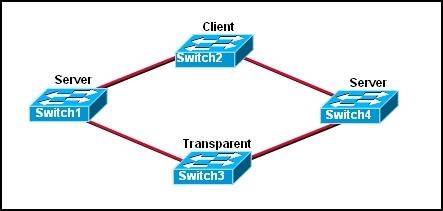
Refer to the exhibit. The switches are connected with trunks within the same VTP management domain. Each switch is labeled with its VTP mode. A new VLAN is added to Switch3. This VLAN does not show up on the other switches. What is the reason for this?
• VLANs cannot be created on transparent mode switches.
• Server mode switches neither listen to nor forward VTP messages from transparent mode switches.
• VLANs created on transparent mode switches are not included in VTP advertisements.
• There are no ports assigned to the new VLAN on the other switches.
• Transparent mode switches do not forward VTP advertisements.

9.      Which two criteria are used by STP to select a root bridge? (Choose two.)
• memory size
• bridge priority
• switching speed
• number of ports
• base MAC address
• switch location

10.  Which three steps should be taken before moving a Catalyst switch to a new VTP management domain? (Choose three.)
• Reboot the switch.
• Reset the VTP counters to allow the switch to synchronize with the other switches in the domain.

• Download the VTP database from the VTP server in the new domain.
• Configure the VTP server in the domain to recognize the BID of the new switch.
• Select the correct VTP mode and version.
• Configure the switch with the name of the new management domain.

11.  Which two items will prevent broadcasts from being sent throughout the network? (Choose two.)
• bridges
• routers
• switches
• VLANs
• hubs

12.  Which two characteristics describe a port in the STP blocking state? (Choose two.)
• provides port security
• displays a steady green light
• learns MAC addresses as BPDUs are processed
• discards data frames received from the attached segment
• receives BPDUs and directs them to the system module

13.  What is the first step in the process of convergence in a spanning tree topology?
• election of the root bridge
• determination of the designated port for each segment
• blocking of the non-designated ports
• selection of the designated trunk port
• activation of the root port for each segment

14.  In which STP state does a switch port transmit user data and learn MAC addresses?
• blocking
• learning
• disabling
• listening
• forwarding
15.  What is the purpose of VTP?
• maintaining consistency in VLAN configuration across the network
• routing frames from one VLAN to another
• routing the frames along the best path between switches
• tagging user data frames with VLAN membership information
• distributing BPDUs to maintain loop-free switched paths

16.  Which statement best describes adaptive cut-through switching?
• The switch initially forwards all traffic using cut-through switching and then changes to store-and-forward switching if errors exceed a threshold value.
• The switch initially forwards all traffic using cut-through switching and then changes to fast-forward switching if errors exceed a threshold value.

• The switch initially forwards all traffic using cut-through switching and then temporarily disables the port if errors exceed a threshold value.
• The switch initially forwards all traffic using store-and-forward switching and then changes to cut-through switching if errors exceed a threshold value.

17.  Using STP, how long does it take for a switch port to go from the blocking state to the forwarding state?
• 2 seconds
• 15 seconds
• 20 seconds
• 50 seconds
18.   
5
Refer to the exhibit. The switches are interconnected by trunked links and are configured for VTP as shown. A new VLAN is added to Switch1. Which three actions will occur? (Choose three.)
• Switch1 will not add the VLAN to its database and will pass the update to Switch 2.
• Switch2 will add the VLAN to its database and pass the update to Switch3.
• Switch3 will pass the VTP update to Switch4.

• Switch3 will add the VLAN to its database.
• Switch4 will add the VLAN to its database.
• Switch4 will not receive the update.

19.  Which Catalyst feature causes a switch port to enter the spanning-tree forwarding state immediately?
• backbonefast
• uplinkfast
• portfast
• rapid spanning tree

20.   
6
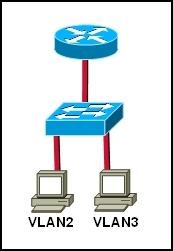
Refer to the exhibit. Which set of commands would be used on the router to provide communication between the two hosts connected to the switch?
• Router(config)# interface vlan 2
Router(config-if)# ip address 192.168.2.1 255.255.255.0
Router(config-if)# no shutdown
Router(config)# interface vlan 3
Router(config-if)# ip address 192.168.3.1 255.255.255.0
Router(config-if)# no shutdown
• Router(config)# interface fastethernet 0/0
Router(config-if)# no shutdown
Router(config-if)# interface fastethernet 0/0.2
Router(config-subif)# encapsulation dot1q 2
Router(config-subif)# ip address 192.168.2.1 255.255.255.0
Router(config-if)# interface fastethernet 0/0.3
Router(config-subif)# encapsulation dot1q 3
Router(config-subif)# ip address 192.168.3.1 255.255.255.0
• Router(config)# interface vlan 2
Router(config-if)# switchport mode trunk dot1q
Router(config)# interface vlan 3
Router(config-if)# switchport mode trunk dot1q
• Router(config)# interface fastethernet 0/0
Router(config-if)# mode trunk dot1q 2 3
Router(config-if)# ip address 192.168.2.1 255.255.255.0v

Kamis, 11 November 2010

CCNA Discovery 2 Module 5 Exam

1. vIn what two ways does SDM differ from the IOS CLI? (Choose two.)
• SDM is used for in-band management only. The IOS CLI can be used for in-band and out-of-band management.
• SDM is accessed through a Telnet application. The IOS CLI is accessed through a web browser.
• SDM is available for all router platforms. The IOS CLI is available for a limited number of Cisco devices.
• SDM utilizes GUI buttons and text boxes. The IOS CLI requires the use of text-based commands.
• SDM is used for advanced configuration tasks. The IOS CLI is preferred for initial basic device configuration.
2. Which mode will a configured router display at login?
• global configuration mode
• setup mode
• ROM monitor mode
• user EXEC mode
3. Refer to the exhibit. Which password or passwords will be encrypted as a result of the configuration that is shown?
• virtual terminal only
• enable mode only
• console and virtual terminal only
• enable mode and virtual terminal
• only the service password
• all configured passwords 4.Refer to the exhibit. Which three sets of commands are required to enable administrators to connect to the Switch1 console over Telnet for configuration and management? (Choose three.)
• Switch1(config)# interface fa0/1
Switch1(config-if)# ip address 192.168.2.64 255.255.255.192
• Switch1(config)# interface fa0/1
Switch1(config-if)# ip address 192.168.2.66 255.255.255.192
• Switch1(config)# interface vlan 1
Switch1(config-if)# ip address 192.168.2.126 255.255.255.192
Switch1(config-if)# no shutdown
• Switch1(config)# line vty 0 4
Switch1(config-line)# enable password cisco
Switch1(config-line)# login
• Switch1(config)# line vty 0 15
Switch1(config-line)# password cisco
Switch1(config-line)# login
• Switch1(config)# ip default-gateway 192.168.2.65
5. How does the SYST LED on the catalyst 2960 switch indicate a POST failure?
• blinks rapidly amber
• blinks rapidly green
• steady amber
• steady green 6.  Refer to the exhibit. A company always uses the last valid IP address in a subnetwork as the IP address of the router LAN interface. A network administrator is using a laptop to configure switch X with a default gateway. Assuming that the switch IP address is 192.168.5.147/24, what command will the administrator use to assign a default gateway to the switch?
• X(config)# ip default-gateway 192.168.5.254
• X(config)# ip gateway 192.168.5.1
• X(config)# ip route 0.0.0.0 0.0.0.0 192.168.5.1
• X(config)# ip default-route 192.168.5.1
• X(config)# ip route 192.168.5.254 255.255.255.0 fastethernet 0/0
7. A technician has made changes to the configuration of a router. What command will allow the technician to view the current configuration before he saves the changes?
• router# show running-config
• router# show startup-config
• router# show flash
• router# show version
8. Passwords can be used to restrict access to all or parts of the Cisco IOS. Select the modes and interfaces that can be protected with passwords. (Choose three.)
• VTY interface
• console interface
• Ethernet interface
• secret EXEC mode
• privileged EXEC mode
• router configuration mode
9. To save time, IOS commands may be partially entered and then completed by typing which key or key combination?
• Tab
• Ctrl-P
• Ctrl-N
• Up Arrow
• Right Arrow
• Down Arrow
10. What is the correct command sequence to configure a router host name to ‘LAB_A’?
• Router> enable
Router# configure terminal
Router(config)# hostname LAB_A
• Router> enable
Router# hostname LAB_A
• Router> enable
Router# configure router
Router(config)# hostname LAB_A
• Router> enable
Router(config)# host name LAB_A
11. Refer to the exhibit. From the router console, an administrator is unable to ping a Catalyst switch that is located in another building. What can the administrator do from her location to check the IP configuration of the attached switch?
• Open an SDM session with the switch from her desktop.
• Telnet to the switch from the router console.
• Use the show cdp neighbors detail command from the router console.
• The administrator must go to the switch location and make a console connection to check these settings.
12. Which two options must be selected in SDM Express to enable a router serial interface to obtain an IP address automatically? (Choose two.)
• Easy IP (IP negotiated)
• IP unnumbered
• No IP address
• HDLC encapsulation
• Frame Relay encapsulation
• PPP encapsulation
13. What three settings can be made in the SDM Express basic configuration screen? (Choose three.)
• host name
• DHCP options
• domain name
• interface IP addresses
• enable secret password
• DNS server IP addresses 14. Which tasks can be accomplished by using the command history feature? (Choose two.)
• View a list of commands entered in a previous session.
• Recall up to 15 command lines by default.
• Set the command history buffer size.
• Recall previously entered commands.
• Save command lines in a log file for future reference.
15. What option within Cisco SDM Express must be configured to allow hosts that receive IP address settings from the router to resolve names on the network or Internet?
• host name
• domain name
• DHCP address pool
• DNS server IP address
16. Which three encapsulation types can be set on a serial interface by an administrator who is using SDM Express? (Choose three.)
• ATM
• CHAP
• Frame Relay
• HDLC
• PAP
• PPP
17. Which command will display routing table information about all known networks and subnetworks?
• Router# show ip interfaces
• Router# show ip connections
• Router# show ip route
• Router# show ip networks
18. A network administrator needs to configure a router. Which of the following connection methods requires network functionality to be accessible?
• console
• AUX
• Telnet
• modem
19. Which three pieces of information about a neighbor device can be obtained by the show cdp neighbors command? (Choose three.)
• platform
• routing protocol
• connected interface of neighbor device
• device ID
• IP addresses of all interfaces
• enable mode password
20.Which function is a unique responsibility of the DCE devices shown in the exhibit?
• transmission of data
• reception of data
• clocking for the synchronous link
• noise cancellation in transmitted data
21. Which of the following are functions of NVRAM? (Choose two.)
• stores the routing table
• retains contents when power is removed
• stores the startup configuration file
• contains the running configuration file
• stores the ARP table
22. Refer to the exhibit. Which series of commands will enable users who are attached to Router1 to access the remote server?
• Router1(config)# interface S0/0/0
Router1(config-if)# ip address 64.100.0.129 255.255.255.252
Router1(config-if)# clock rate 64000
Router1(config-if)# no shutdown
• Router1(config)# interface S0/0/0
Router1(config-if)# ip address 64.100.0.125 255.255.255.252
Router1(config-if)# no shutdown
• Router1(config)# interface S0/0/0
Router1(config-if)# ip address 64.100.0.125 255.255.255.252
Router1(config-if)# clock rate 64000
Router1(config-if)# no shutdown
• Router1(config)# interface S0/0/0
Router1(config-if)# ip address 64.100.0.129 255.255.255.252
Router1(config-if)# no shutdown
23. A network technician is attempting to add an older workstation to a Cisco switched LAN. The technician has manually configured the workstation to full-duplex mode in order to enhance the network performance of the workstation. However, when the device is attached to the network, performance degrades and excess collision are detected. What is the cause of this problem?
• The host is configured in a different subnet from the subnet of the switch.
• There is a duplex mismatch between the workstation and switch port.
• The switch port is running at a different speed from the speed of the workstation NIC.
• The host has been configured with a default gateway that is different from that of the switch.
24. Which of the following statements are true regarding the user EXEC mode? (Choose two.)
• All router commands are available.
• Global configuration mode can be accessed by entering the enable command.
• A password can be entered to allow access to other modes.
• Interfaces and routing protocols can be configured.
• Only some aspects of the router configuration can be viewed.
25. Which command turns on a router interface?
• Router(config-if)# enable
• Router(config-if)# no down
• Router(config-if)# s0 active
• Router(config-if)# interface up
• Router(config-if)# no shutdown